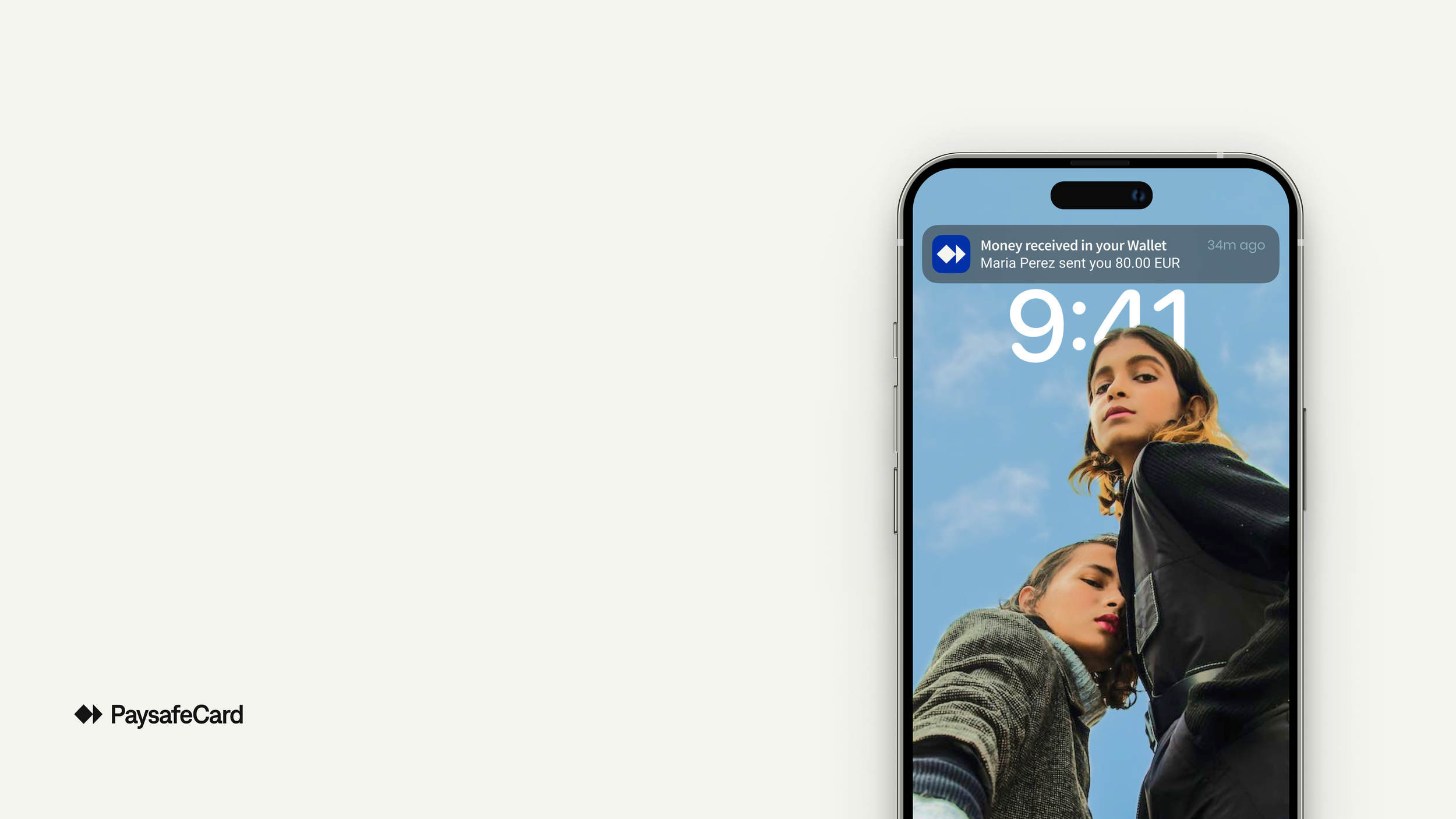
Wallet to Wallet:
send money to friend
Context, Team & my role, Who it was for, Scope, GoalsPaysafeCard's Wallet had no way for users to send money directly to each other, despite it being the most requested feature from users. I led the design of an MVP peer-to-peer send feature within Wallet, from initial flow through usability testing and accessibility sign-off, delivered across two sprints.
❋ Team & my roleI was the lead product designer, working alongside a product manager, product owners, a product design manager, developers, and a UX writer. I owned the end-to-end flow design and ran usability testing myself. Copy was shaped in close collaboration with the UX writer. I wasn't involved in the legal negotiations directly, but I led the scope discussions with the PM and PO, including pushing back on parts of the original scope.
❋ Who it was forAll PaysafeCard users with a Wallet membership. The primary segment was gamers aged 20–50, based across Europe; a smaller secondary segment was content creators using the app to receive income with less bureaucracy than traditional banking.
❋ ScopeThe MVP was scoped to instant transfers between Wallet members only — phonebook contact syncing and sending to phone numbers outside Wallet were explicitly excluded. That boundary also set the legal constraint we designed around: entering a phone number or email could surface information about an existing user, so what a sender could see about a matched recipient had to be carefully limited.
❋ GoalsThe feature needed to move four metrics: P2P transactions per month, P2P adoption rate among monthly active users, displacement of low-value SEPA OPP transfers, and uplift in wallet top-up frequency and volume.
PaysafeCard is a prepaid payment method that lets people pay online without a bank account or credit card. 'Wallet' is its subscription-based upgrade, giving users a regular IBAN and a physical card, features that aren't available to non-subscribed PaysafeCard users by default. This 'Wallet-to-Wallet' feature was built specifically for the subscribers, so they could send each other money instantly rather than relying on a traditional bank transfer.
Persona 1: The GamerLukas Weber
Quote: "I just want to send my share the second we're all talking about it — not open my banking app and wait until tomorrow."
Age31
Lives inBerlin, Germany
JobFront-end developer in a start-up company
GoalsKeeps "fun money" separate from his real money; plays games and is active in Berlin's gaming community
FrustrationsSplits gaming subscriptions and payments with people he mostly knows through online communities and may never meet in person; finds German banks too bureaucratic for this kind of casual, recurring split. This is a friction he already feels more acutely navigating financial admin as a newcomer to the system
BehaviorPays for shared subscriptions (Discord Nitro, co-op game passes, LAN event tickets) in small, recurring amounts, often split three or four ways

Persona 2: The Content Creator
Giulia Ferrari
Quote: "I don't want to open three different apps just to pay someone back for an hour of editing."
Age
26
Lives inParis, France
JobFreelance content creator
GoalsWants a dedicated place to keep her side-project income separate from her main finances
FrustrationsShe collaborates with other creators in her work and wants one place to manage payments, instead of scattering them across different apps
FrustrationsFrequently pays small, one-off amounts to editors, photographers, or other creators she collaborates with on a project basis. This comes often on short notice, right after a shoot or edit is delivered
How might we...
help users like Kacper and Giulia send money to people they share interests with, without leaving the app they're already using?Key decisions
I. The entry point
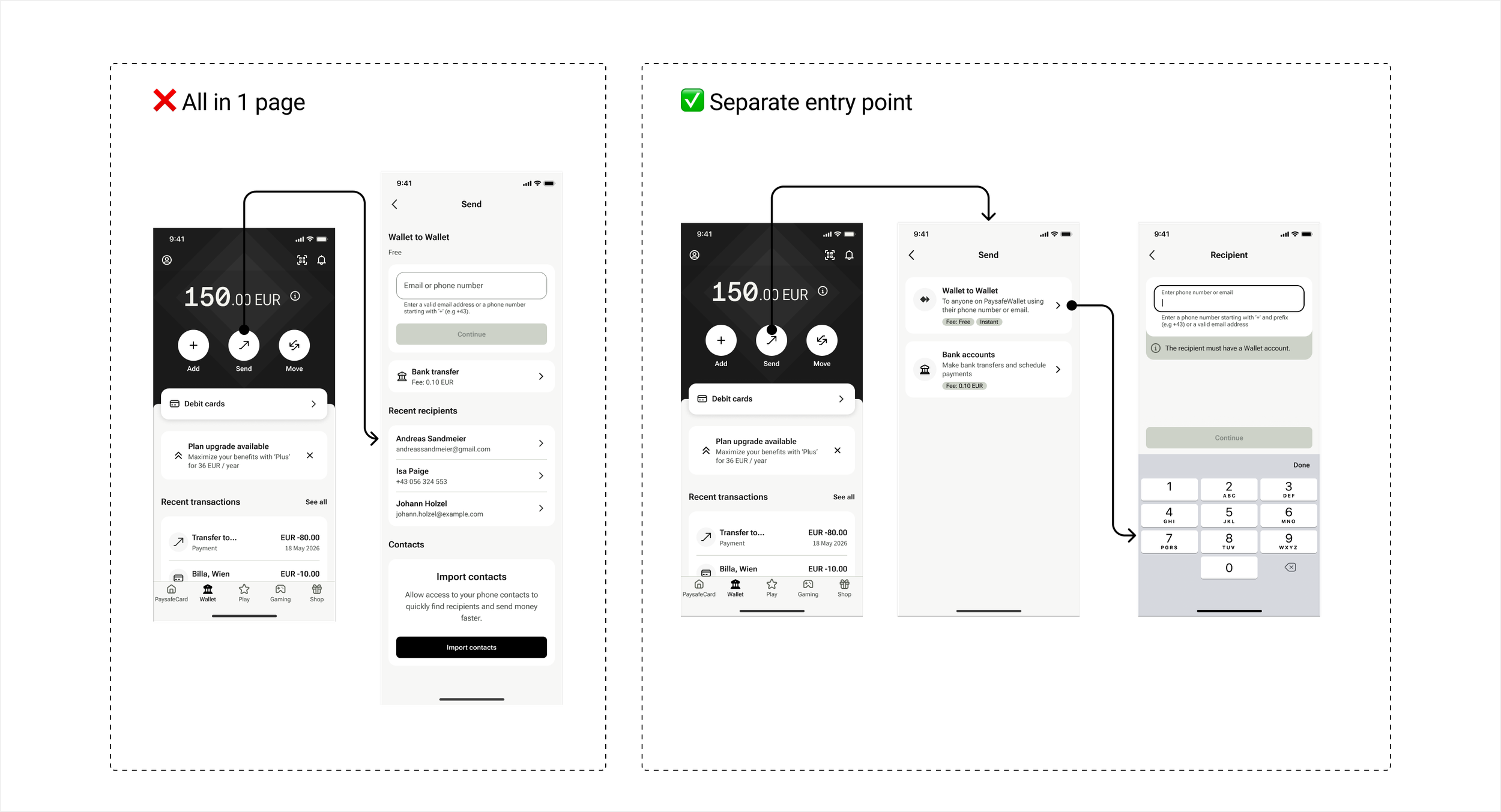
Users could already make SEPA bank transfers with IBAN details, and we were adding Wallet-to-Wallet as a new, faster option, not replacing bank transfers. The open question was where the two should live: combining the phone/email field and bank transfer option on one page would save the user a click and a decision. But the two methods differ too much under the hood (fee, speed, required data, payment type) to sit together without
Naming was debated too: we usability tested "Wallet to Wallet" as the label, and it landed immediately, every participant understood what it meant and recalled it later in the session without prompting. That was enough to settle it, and we kept the name.
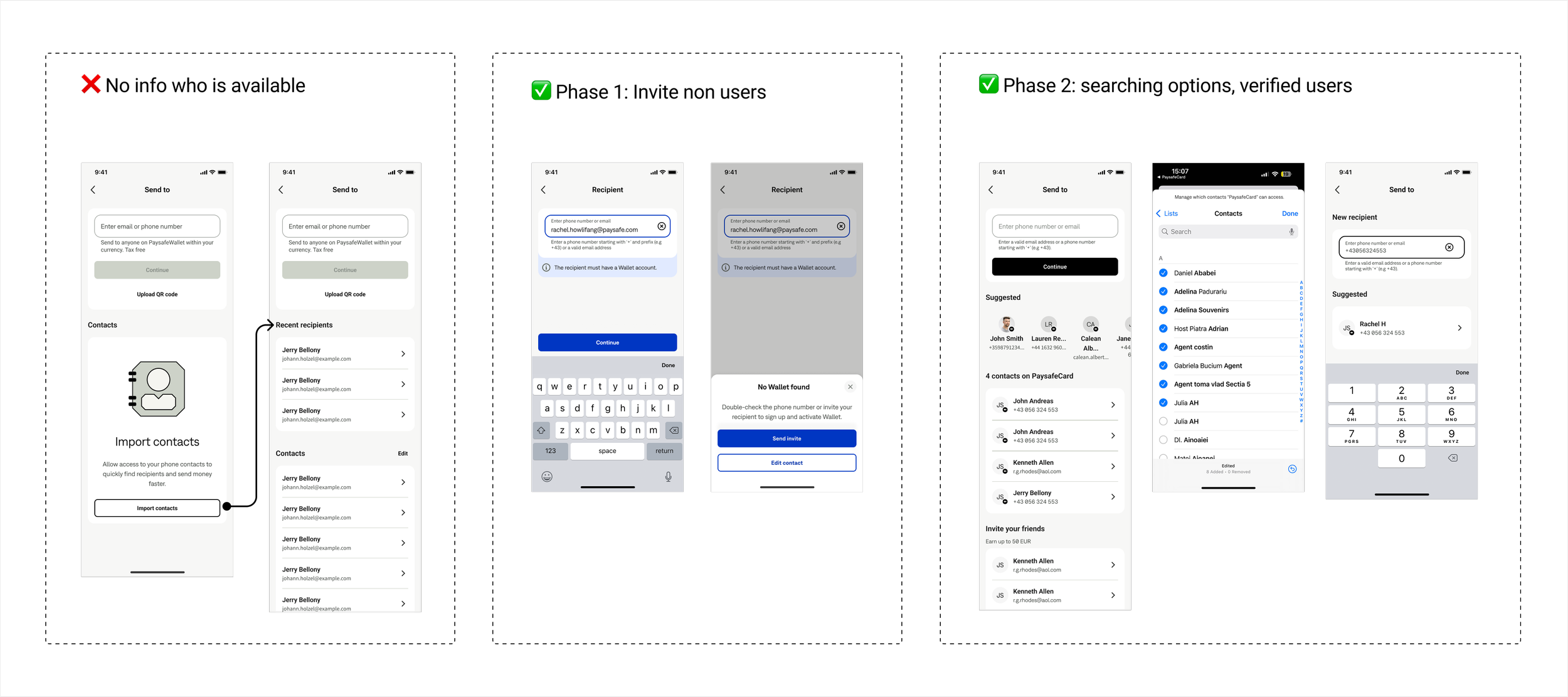
Phase 1: when a user manually enters a phone number or email that's correctly formatted but doesn't match a Wallet account, we show that clearly and offer a Send invite option, turning that moment into a referral opportunity that could convert non-users into sign-ups.
Phase 2, deferred further out, adds proper search and visibly distinguishes verified PaysafeCard contacts within the list.
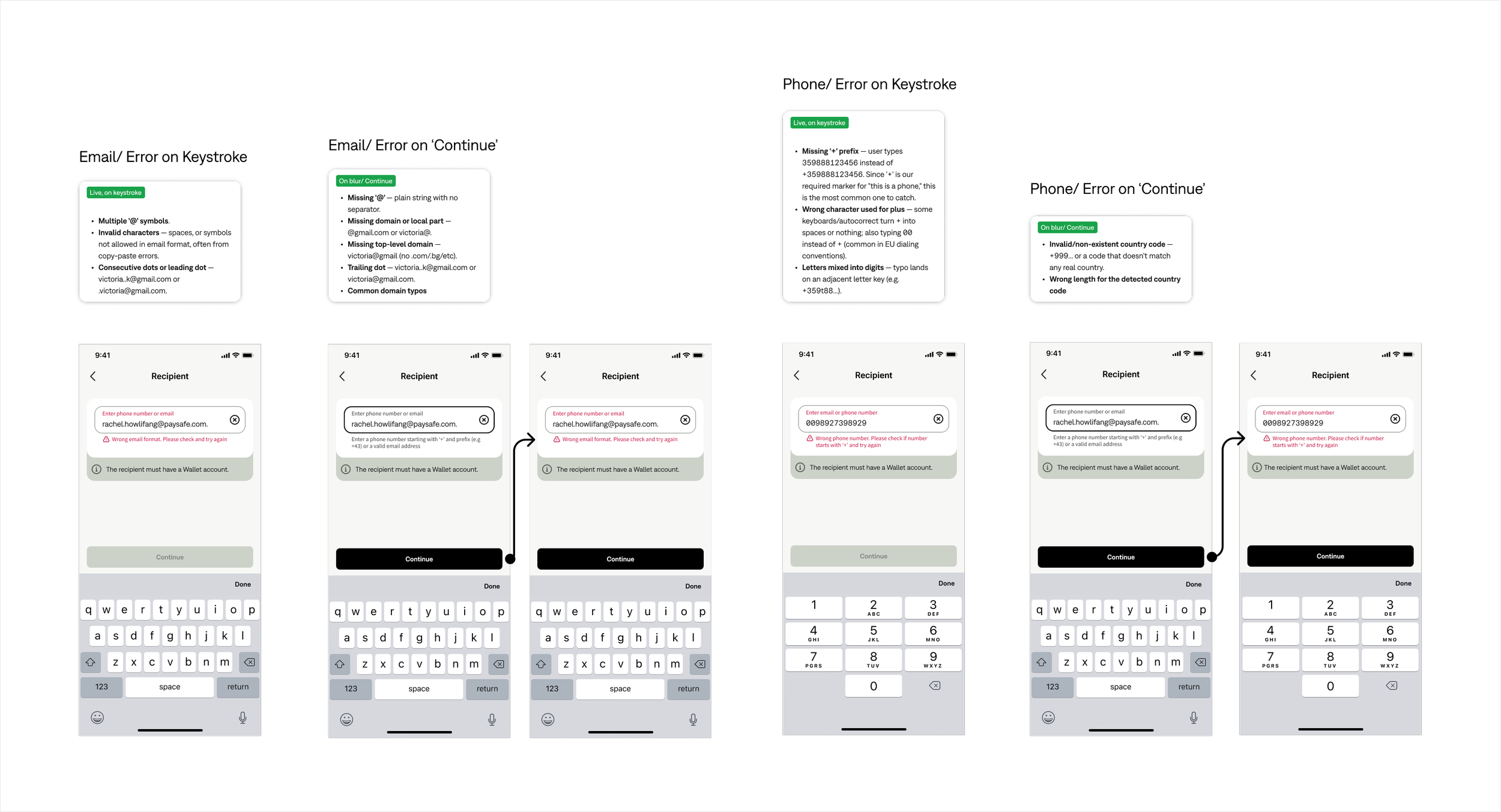
III. Recipient field validation & error feedback
The product's existing pattern for an invalid recipient entry was to give no feedback at all, the field wouldn't react and the action button just stayed disabled. I made the case to the PO that this needed real, in-the-moment feedback instead, and we worked through two validation-timing models, live/on-keystroke vs. on-blur/on-continue, landing on different timing per error type and field (email vs. phone), since some errors are wrong the instant
confusing someone who's already focused on finding a contact.
We tested this on one page and agreed it felt cluttered once actually laid out, so instead we added a middle "Send" page that clearly separates the two, letting the user pick with full context before committing to either flow. It also meant the structure could absorb future payment options without redesigning the entry point again. Sometimes more steps is actually better.
II. Phonebook contact sync (explored, left for Phase 2)
We planned to sync a user's phone contacts so they could find PaysafeCard users without typing details. The legal department refused to display any synced user data, even names, leaving a plain contact list with no way to know who was on PaysafeCard, and no way to search it either. With some users holding 200+ contacts, that alone made it unusable, and the lack of visibility also risked undermining trust in the product: sending money without confidence in
who you're sending it to is a transparency issue with real business consequences.
We debated it in critique sessions: list on the same page, input field doubling as search (the pattern Revolut, Skrill, and N26 use), or a separate modal. We didn't have the capacity to build the full version within the MVP deadline, so instead of cutting it outright, we split it into phases.
they're typed and others only become wrong once the user stops typing.
This wasn't just a hunch either: usability testing surfaced two High-severity issues tied to exactly this gap, unnoticed inline errors and unclear failure messaging, confirming that silent, disabled-button feedback wasn't good enough for release.
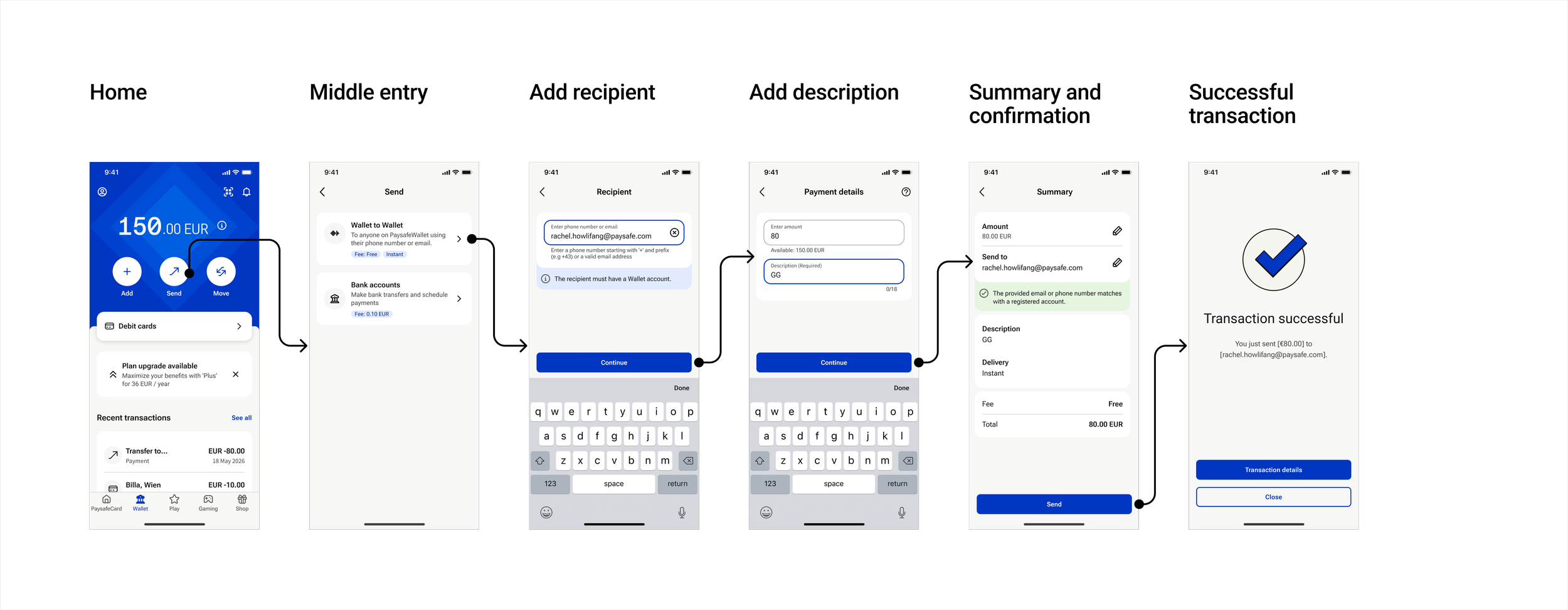
The ‘Happy path’
The happy path shipped in six steps: Home → Send → recipient → amount/description → summary confirmation (verifying the recipient matches a registered account) → success. All 5 usability test participants completed it unassisted in under 2 minutes.
Behind it sat a longer list of edge cases: invalid input, no access for verification, connectivity drops, expiration, and more, not shown here, but just as much of the design work.
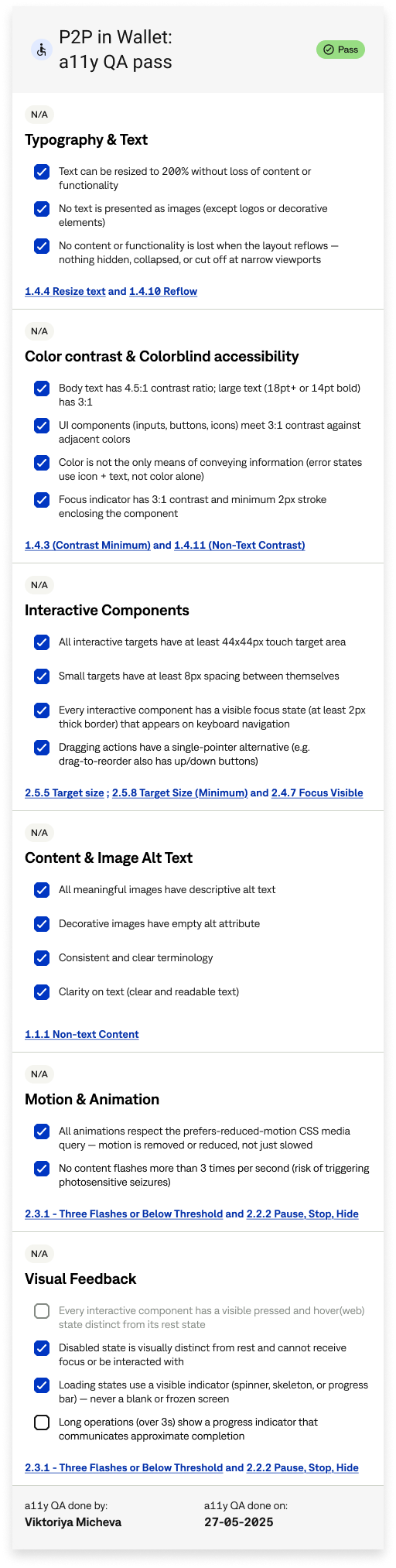
Accessibility & design system
The feature passed a full a11y QA review before release, covering resizable text, color contrast (4.5:1 body text, non-color error indicators), touch target sizing, alt text, and reduced-motion support, so the goal was that no one using assistive technology or accessibility settings would be blocked from sending money.
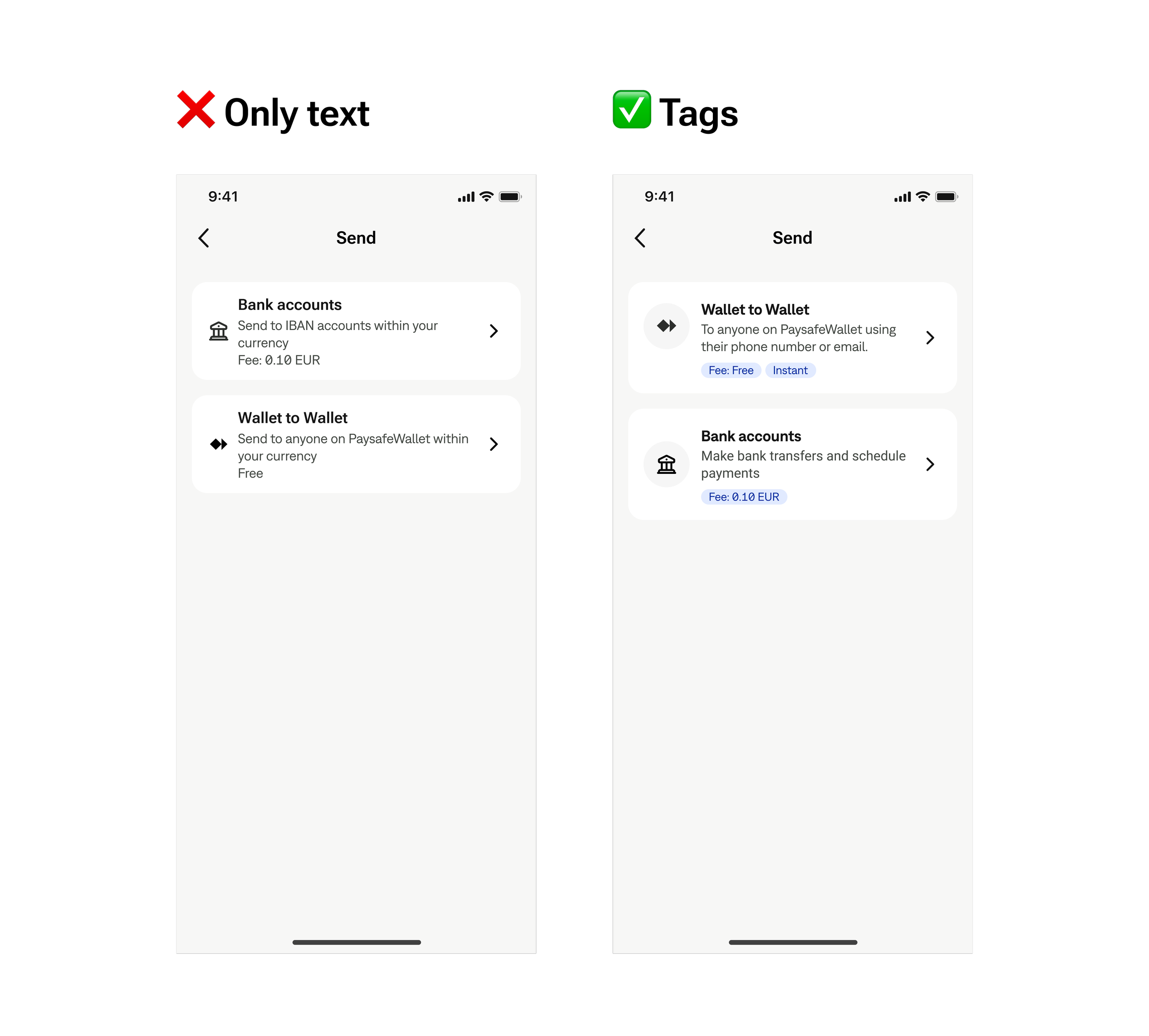
Extending the design system
We built the feature from the existing design system, reusing 95% of its components. The one addition was tags on the middle entry page, used to visually distinguish Wallet-to-Wallet (free, instant) from bank transfers (fee, scheduled payments) at a glance, rather than relying on body text alone to carry that difference.
Overview
This project was less about designing a new screen and more about making sharp calls under real constraints: a fixed two-sprint timeline, legal limits that ruled out contact sync, and a product pattern (silent disabled buttons) that needed pushback, not just a redesign. What I'm most proud of isn't what shipped, it's what I kept out.
Success was defined against 4 KPIs: P2P transactions per month, P2P adoption rate, SEPA OPP displacement,
and funding uplift among P2P-active users.
Usability testing validated the core decisions, the sending flow, confirmation screen, entry-point structure, and naming, while confirming exactly the gap scope and legal constraints had pushed to Phase 2: verify Wallet recipients. The feature shipped fully accessible and nearly entirely from the design system. That's the honest state of the MVP: fast and trusted, with a known, documented gap.
Other works